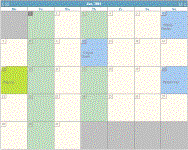
Figure 1. Month in block format.

Figure 2. Month full list format.
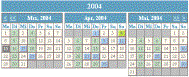
Figure 3. Multi-language support shown in month compressed block format.

Figure 4. Week in compressed block format.
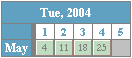
Figure 5. Weekday in compressed block format.
Familiar Calendar Formats
- Automatic display of information in common calendar views and formats
- Create your own custom calendar display formats
- Automatic display of holidays and special days
- Create your own custom holiday and special day lists
Calendar Views and Formats
Automatic calendar views provided are month, week, and weekday. Each view may be formatted as block (figure 1), full list (figure 2), compressed block (figures 3-5), compressed list, plan, or you may create a custom format of your choice. The month view shows the days in the month by date (figure 1-3). The week view shows a single week (figure 4). And the weekday view shows specific weekday occurrences in the month (figure 5).
A wide range of attributes are available to control view and format. Examples include:
- weekend display as first, last, or hidden.
- title and text content, language, and format control.
- number of months, weeks or weekdays displayed
- format and color control for a group of weekdays or special days.
View and Format Control Example (figure 3) :
Display 3 months in compressed block format beginning March 15, 2004 on 1 row with 3 columns; display Saturday and Sunday last; display Tuesday and Thursday in teal; display a calendar title containing the current year; scroll by month and year; and display date information in German.
Holidays and Special Days
Holiday or Special day descriptions are displayed as text in block (figure 1), list or full list (figure 2) formats and as mouse over text for compressed block and plan formats. US Federal Holidays (paid holidays for federal employees), US Social Days, Social Days and Religious Days are all predefined lists displayed automatically for your convenience. US Federal holidays and US Social days are designated by the US Congress. Religious days also known as Ecclesiastical days are designated by the Roman Catholic Church. Social days are those commonly recognized like Valentine’s Day, Earth Day and Arbor Day. Each list may be altered or disabled as your needs dictate. Figure 4 shows Memorial Day (last Monday in May) as a US Federal Holiday.
An unlimited number of custom Special Day lists may be created and displayed. A special day is defined as either a fixed day of a month or a day that is calculated. Calculated days may be based on weekday, week in month, an offset from a known date, or a combination of attributes.
Calculated Special Day Examples:
Mardi Gras is the Tuesday before Ash Wednesday, and Ash Wednesday is a number of days before Easter, and Easter is a calculated day based on a formula set by the Catholic Church. US Presidential Inauguration is the 20th of January following the Presidential Election and the Presidential Election occurs once every 4 years on the first Tuesday after November 2nd. Ash Wednesday and Easter are on the Religious days list, Mardi Gras is on the Social days list, and US Presidential Inauguration and US Presidential Election are both contained on the US Social days list. Each of these days are calculated using the attributes available in the taglib.

Figure 6. Default calendar.
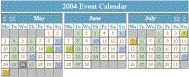
Figure 7. Customized calendar.
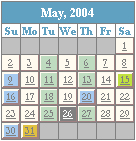
Figure 8. Customized calendar.
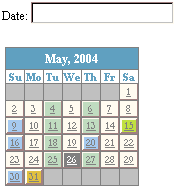
Figure 9. Customized calendar.
Automated Interaction
- Configure and control automatic interaction of scrolling and date selection
- Scroll day, weekday, week, month, and year in any combination
- Link based on special day or any date selection
- Populate form field from date selection
- Create your own custom event interaction integrated with Javascript
Automated Scrolling
Automatic scrolling may be enabled for each view and format. When multiple rows and columns are displayed (figure 6) the appropriate scroll selectors appear in each corner. In addition, a custom image may be provided as the scroll indicator.
Syntax to display current date in compressed block month format (figure 6):
<cal:calendar/>Syntax to display 3 months, with a custom calendar title and month title, place the weekend last, and add page and year scrolling. Mouseover text is defined and displayed for both page and year selectors (figure 7):
<cal:calendar> title= '$YYYY Event Calendar' ><cal:title name= "monthTitle" titleFormat= "$MMMM" />
<cal:display maxCount= "3" displayWeekend= "last" />
<cal:click name "scrollMonth" type= "scrollPage" descr= 'scroll page' />
<cal:click name= "scrollYear" descr= 'scroll year' />
</cal:calendar>
Automated Date Selection
Date selection may be configured to link to text on the current web page, a new web page, or opened in a new window (figure 8). The link may be configured for a Special day or for each date. Optionally the date selected is passed as a parameter to the selected web page or a Javascript routine.
Syntax Example (figure 8):
<cal:calendar><cal:click name= "selectDay"
link= 'http://www.almanac.com/rise/results.php?what%5B%5D=Sun&month=$M&day=$D&year=$YYYY&zipcode=02021' target= "new" />
</cal:calendar>
Form fields may be populated automatically based on date selection. Selection may be from the same web page (figure 9) or a pop-up window. Optionally, multiple selections may be appended to the form field.
Syntax Example (figure 9):
<form name= myForm >Date: <input type= "text" name= "startDate" /> </form>
. . .
<cal:calendar>
<cal:click name= "selectDay" toField= "myForm.startDate" />
</cal:calendar>
. . .
How to Buy
Trial License
Obtain a trial license for execution and testing. The trial license provides full imCalendar Express functionality for a limited time.
License Subscription
Obtain an annual subscription for your server. Unlimited access to your licensed server from any browser. Volume discounts and other licensing options are available. Other license options include site group, enterprise (corporation) and commercial software distribution.
Available from Intelligent Mobility at www.intelmobility.com.